
🌐 Multiple Google Accounts Management Guide — How to Manage Multiple Google Accounts Efficiently?
Managing multiple Google accounts can be challenging. Whether you’re into e-commerce, social media marketing, or digital advertising, handling multiple Gmail inboxes, Google Ads accounts, and YouTube channels often requires constant switching between Google accounts. Frequent switching wastes time and hampers work efficiency.
This article offers a complete guide to help you manage multiple Google accounts efficiently and securely with OKBrowser Fingerprint Browser.

Why Create Multiple Google Accounts?
1️⃣ Multiple Gmail Account Management
Create different Gmail accounts to separate personal and work emails, ensuring effective email organization.
2️⃣ Managing Multiple Google Ads Accounts
For marketers, managing multiple Google Ads accounts for different clients is crucial to allocate budgets accurately and track campaign performance.
3️⃣ Managing Multiple YouTube Channels
With multiple Google accounts, you can run various YouTube channels, each with a different theme, and analyze performance data.
4️⃣ Maintain Different Online Identities
Keep activities separate across social media and other platforms to reduce privacy risks.
5️⃣ Backup Account Creation
Having backup accounts ensures you won’t face disruption if one account is banned.
Google’s Multi-Account Policy
Google allows users to create multiple accounts but requires each account to have a unique email address. Be sure to comply with Google’s terms of service to avoid potential account bans.
Managing Multiple Accounts on Google Chrome
Using Google Account Switcher
- Sign in to Your Main Account
Open Chrome and log in to your main account.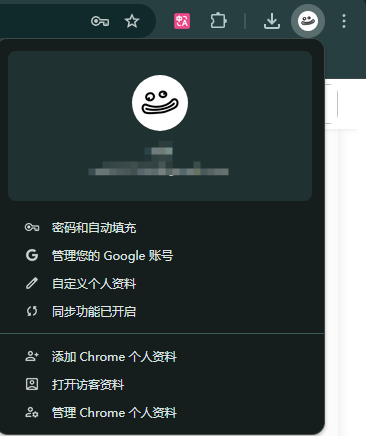
- Add Other Accounts
Click the profile icon and choose “Add” to add other accounts.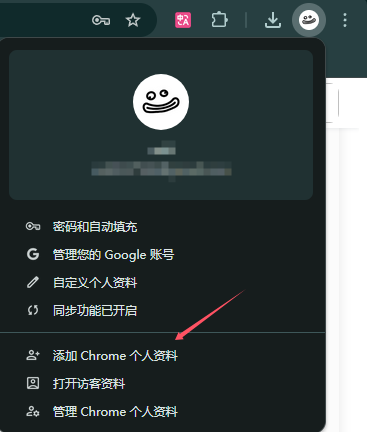
- Switch Accounts
Click the profile icon and select the account you want to switch to.
Using Incognito Mode for Temporary Logins
Use Incognito Mode to temporarily log in without affecting your active sessions.
Challenges and Risks of Managing Multiple Google Accounts
Switching accounts frequently can lead to issues like account association, browser cache conflicts, and privacy risks.
How to Manage Multiple Google Accounts Efficiently?
For enhanced security, anonymity, and efficiency, use OKBrowser to manage your multiple Google accounts. OKBrowser allows you to avoid account association risks by modifying device fingerprints and supports unlimited account management with independent IP configurations.
Conclusion
Managing multiple Google accounts securely and efficiently is key to boosting productivity.